
So, I wanted a quick graphical web browser on my Pi, which I have already installed remRina for using my Pi as a thin client which is working quite well. Follow that here (as soon as i can create a damn link?!)
I did say quick right? In fact I just got the web browser installed on the pi and am typing this up. It’s slow. But i am using WordPress!
sudo apt updatesudo apt install firefox-esr openboxExtras:
sudo apt install fonts-liberation fonts-dejavu fonts-noto-core fonts-noto-color-emoji fonts-freefont-ttf gstreamer1.0-libav gstreamer1.0-plugins-good ffmpeg x11-xserver-utilssudo nano /usr/local/bin/web#!/bin/bash
# Get the active TTY number
VT_NUM=$(fgconsole)
# Launch openbox in the background to handle window sizing, then launch firefox maximized
xinit /bin/sh -c "xsetroot -cursor_name left_ptr & openbox & exec /usr/bin/firefox-esr --start-maximized 'https://flexpaul.net'" -- :$VT_NUM vt$VT_NUMCorrected bin/firegox-esr to bin/firefox-esr
The correction occurred because i wanted a ‘firefox’ logo to be displayed as the program opened.
apt install xloadimage
new bin/bash file
#!/bin/bash
VT_NUM=$(fgconsole)
Launch openbox, set the firefox background using xloadimage, and launch firefox maximized
xinit /bin/sh -c “
xsetroot -cursor_name left_ptr &
openbox &
xloadimage -onroot -fullscreen /path/to/firefox-logo.jpg &
exec /usr/bin/firefox-esr –start-maximized ‘https://flexpaul.net‘
” — :$VT_NUM vt$VT_NUM
sudo chmod +x /usr/local/bin/websudo usermod -a -G tty,video,input,render,audio $USERthen logout and back in once for the group changes to take effect.
Oh, for the hell of it, and just fun to see which works better, we created a bin file for Remmina, called it rdc or rdp, it is up to you, and linked the thinclient user’s Remmina configuration to our profile.
So, I decided to take a break, here is what I want to try:
Remmina stores its configurations and saved connection profiles inside
~/.local/share/remmina and ~/.config/remmina.
Run these commands under your regular user account to link directly to thinclient’s settings:
Remove existing default folders for your regular user
rm -rf ~/.config/remmina ~/.local/share/remminaCreate symbolic links pointing to thinclient’s settings
ln -s /home/thinclient/.config/remmina ~/.config/remmina
ln -s /home/thinclient/.local/share/remmina ~/.local/share/remmina
For your regular user to read and update thinclient’s connection files, both users need shared group access to those directories.
Add your user to the thinclient group (or vice versa):
sudo usermod -a -G thinclient $USER
Adjust group permissions on thinclient’s Remmina folders so both users can edit profiles:
We had some issues, so let’s try this next time, we added it later and it fixed our issue so if you do it here, you may never run into the issue. (Permissions Settings)
sudo chmod 750 /home/thinclient/.local
sudo chmod 750 /home/thinclient/.local/share
sudo chmod -R 770 /home/thinclient/.config/remmina
sudo chmod -R 770 /home/thinclient/.local/share/remmina
sudo chown -R thinclient:thinclient /home/thinclient/.config/remmina
sudo chown -R thinclient:thinclient /home/thinclient/.local/share/remminaCreate and open the file:
sudo nano /usr/local/bin/rdp
Enter the following:
#!/bin/bash
# Detect active TTY console number
VT_NUM=$(fgconsole)

# Launch Openbox + Remmina in fullscreen mode on the active TTY
xinit /bin/sh -c "xsetroot -cursor_name left_ptr & openbox --config-file ~/.config/openbox/rc.xml & exec /usr/bin/remmina --enable-fullscreen" -- :$VT_NUM vt$VT_NUM
Save and make the binary script executable:
sudo chmod +x /usr/local/bin/rdpsudo chmod 750 /home/thinclientsudo chown -R thinclient:thinclient /home/thinclient/.config/remmina /home/thinclient/.local/share/remminasudo chmod -R 770 /home/thinclient/.config/remmina /home/thinclient/.local/share/remminasudo chmod -R 770 /home/thinclient/.local/share/remmina
sudo chmod -R thinclient:thinclient /home/thinclient/.local/share/remminaTest if that dont work run the first two
it was the first two we needed to run to get the proper permissions!!
All working now!!

OMG… So I just have to complain. I was attempting to add the above, and well, found out that….
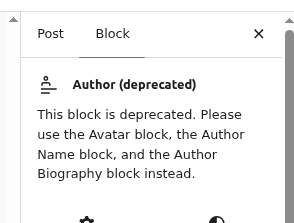
So, instead of just one, quick step of adding the author block, I now have 3 things I have to do!! I know of a guy named Bender that had an issue with 2 things one time…
Leave a Reply
You must be logged in to post a comment.